


















ULTRACAR / APP GUIDE
How to download the app & pay to renew
Download UltracarVN, install it and allow permissions, register for a trial, then renew when needed. Each step below includes written instructions and an illustration.
Download via Google Drive · For Samsung DeX devices with One UI 8 or earlier.
Offer price through . From : VND 350,000/year. Illustrations may show an older interface; check the details currently displayed in the app before paying.
Already purchased an UltraCar display combo? See how to activate your included three years of app access →
WATCH THE VIDEO
How to download and install the UltraCar app
Follow the steps to download the APK, open the installer, and launch the UltraCar app on the display.
Duration · 2:11
Download the APK to your device
- Tap “Download UltraCar app” at the top of this page to open the Google Drive folder supplied by UltraCar. Select the UltracarVN file ending in .apk.
- Open the file’s three-dot menu and select “Tải xuống” (Download). The file name and version may change.
- If Google Drive says it cannot scan the file, select “Vẫn tải xuống” (Download anyway) only after confirming that you are using the UltraCar folder linked above.
- Wait for the download to finish. The file will be in the device’s Downloads folder.

Install UltracarVN
- Open “File của bạn” (My Files) → “Tải về” (Downloads), then select the UltracarVN .apk file you just downloaded.
- If Android requests permission to install from this source, open Settings and allow the app that is opening the APK, such as My Files or Chrome.
- Go back, tap “Cài đặt” (Install), and wait for installation to finish. Then tap “Mở” (Open).

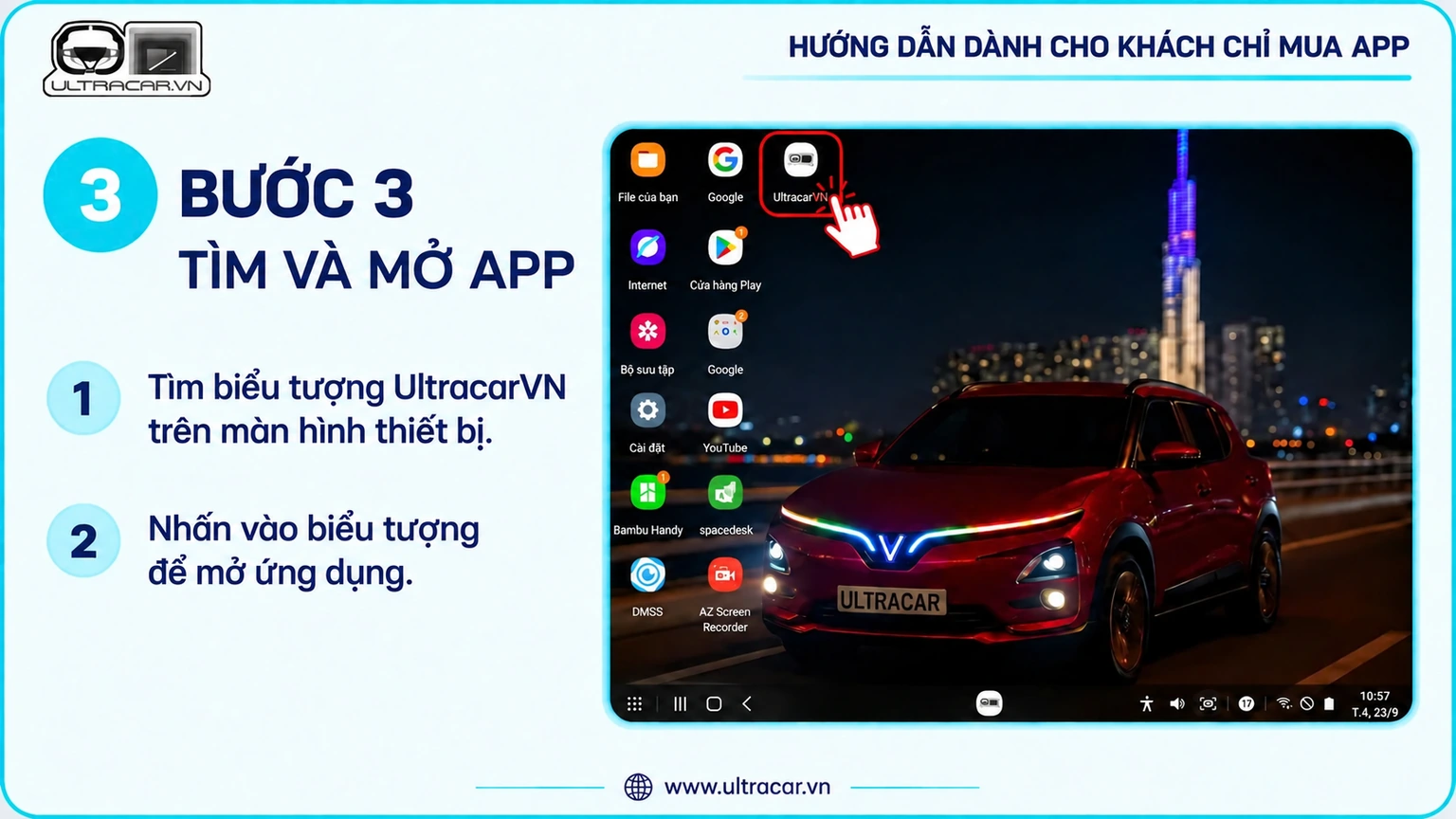
Find and open the app
- Find the “UltracarVN” icon on your home screen or in your device’s app list.
- Tap the icon to open the app. If the app is already open after installation, continue to the permissions step.
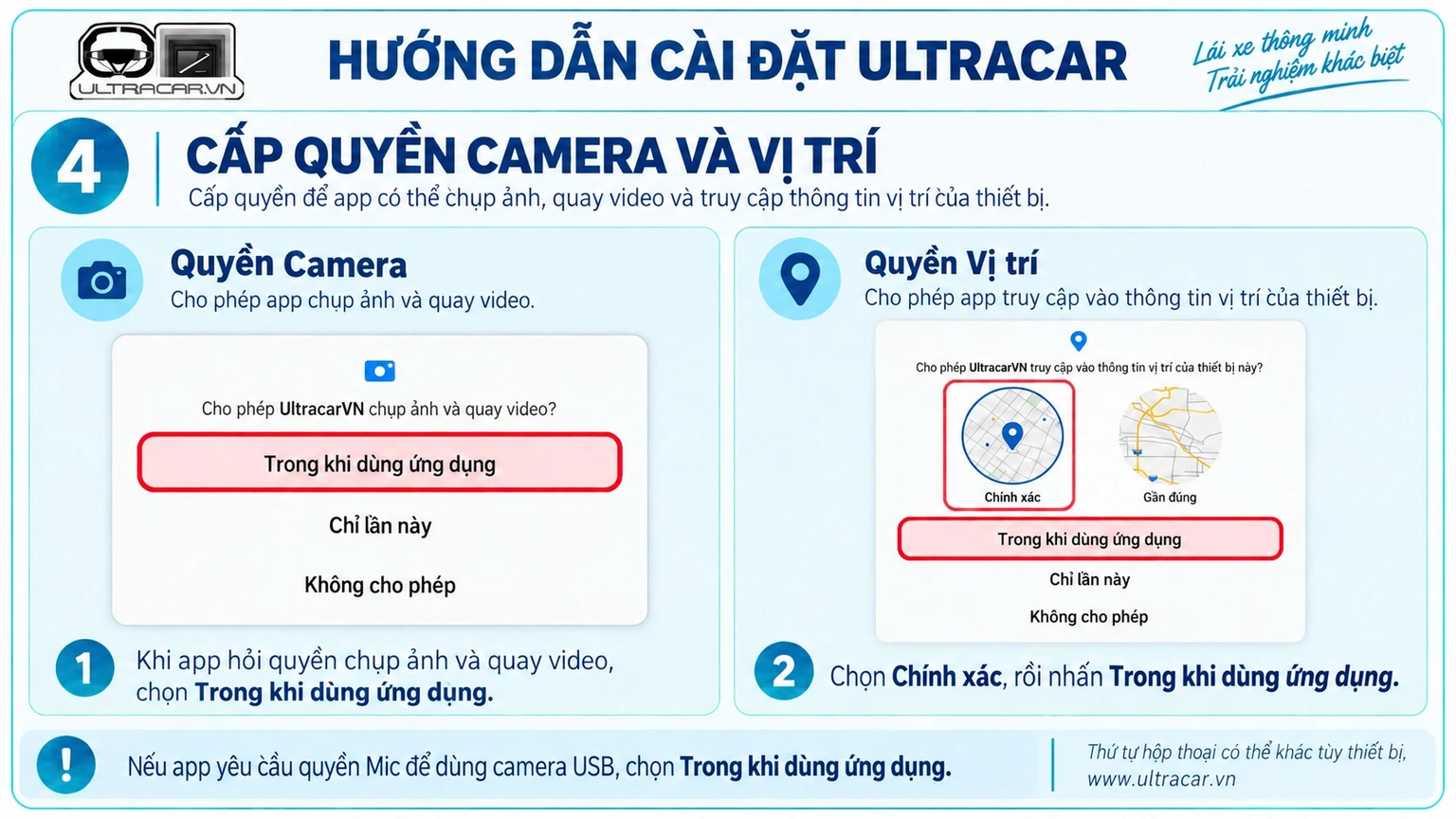
Allow Camera and Location access
- When the app requests Camera access, select “Trong khi dùng ứng dụng” (While using the app) to use photo or video features.
- When the app requests Location access, choose “Chính xác” (Precise), then “Trong khi dùng ứng dụng” (While using the app).
- If the app requests Microphone access for a USB camera, select “While using the app”. The order of these prompts may vary by device.
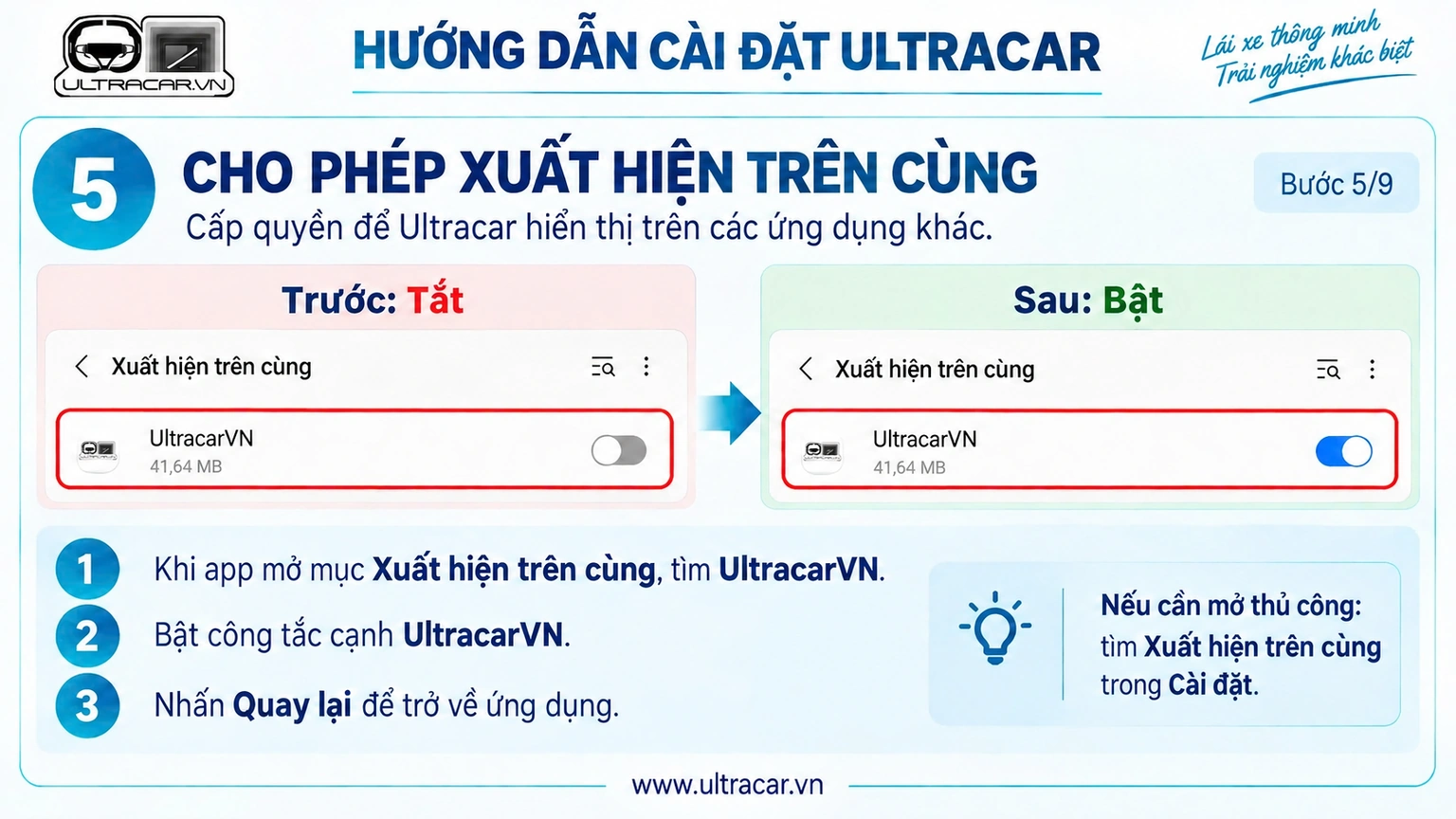
Allow the app to appear on top
- When the app opens “Xuất hiện trên cùng” (Appear on top), find “UltracarVN”. To open it manually, search for this setting in Settings.
- Turn on the switch next to “UltracarVN” so it can display over other apps.
- Tap Back to return to the app.
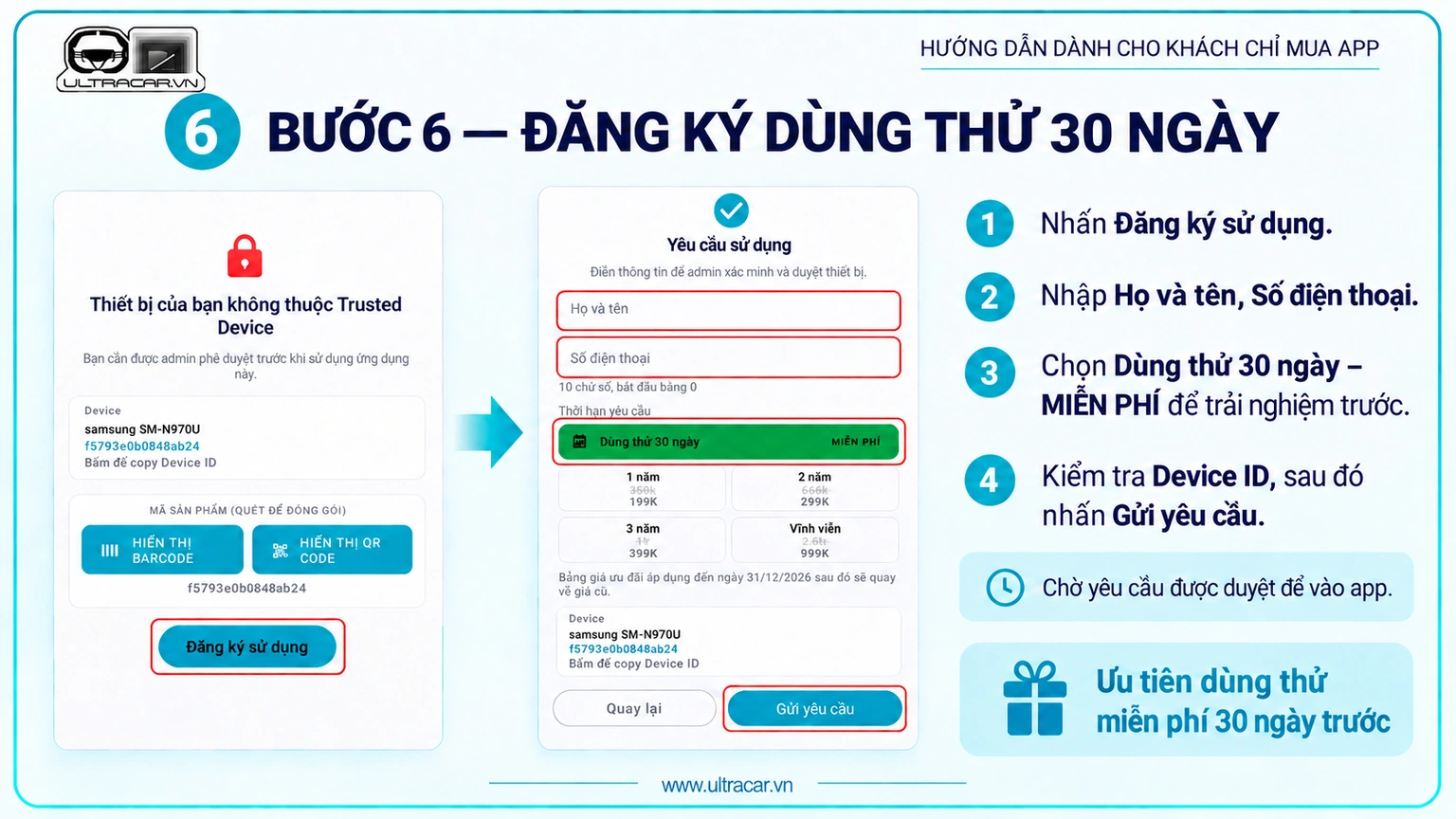
Register for a free 30-day trial
- On the screen saying your device is not a Trusted Device, select “Đăng ký sử dụng” (Register for access).
- Enter your full name and phone number, then choose “Dùng thử 30 ngày – MIỄN PHÍ” (Free 30-day trial).
- Check the Device ID shown on the device you want to use. Tap “Gửi yêu cầu” (Send request).
- Wait for the request to be approved before using the app. If you purchased an UltraCar display combo, use the genuine-product activation guide to claim the included three years of app access.
Bought a display? View the genuine-product activation guide. →
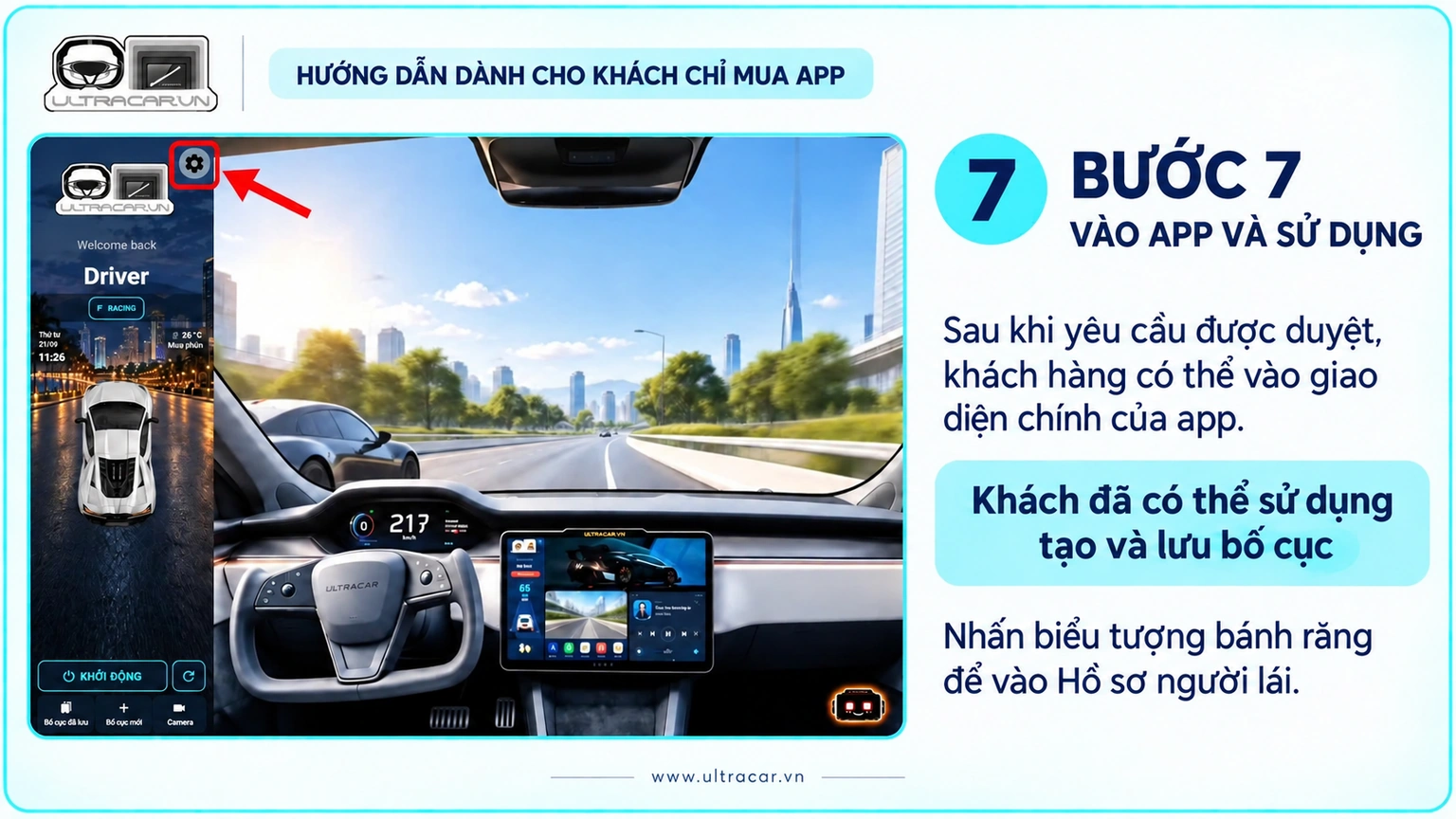
Open the app, create and save layouts
- After approval, open the app’s main interface. You can create and save app layouts.
- Tap the gear icon to open “Hồ sơ người lái” (Driver profile), where you can check device details and your access expiry.
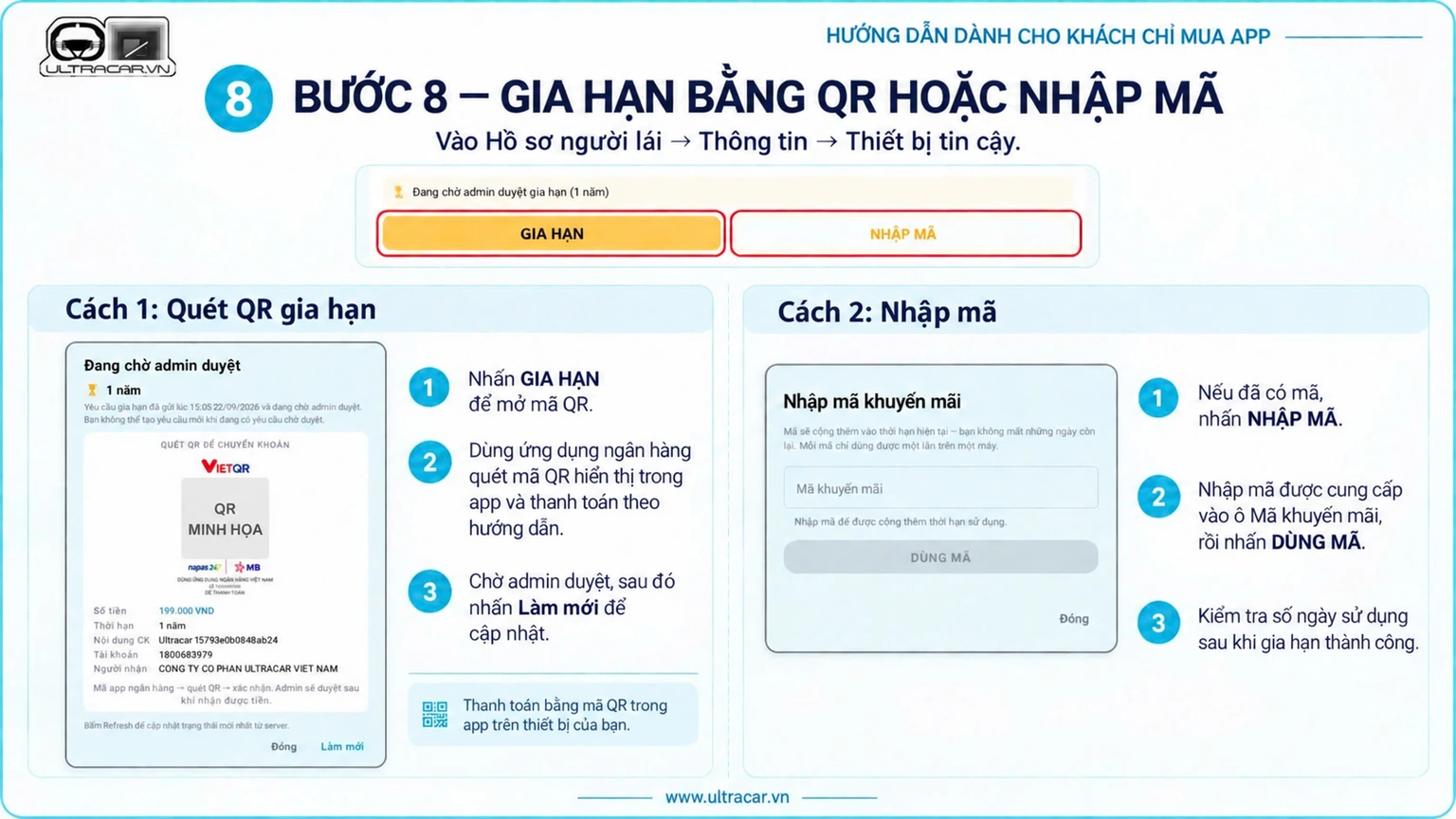
Pay to renew or redeem a code
- Go to “Hồ sơ người lái” (Driver profile) → “Thông tin” (Information) → “Thiết bị tin cậy” (Trusted device).
- Select “Gia hạn” (Renew) to view the plan and payment QR code on the device you want to renew.
- Use your banking app to scan the QR code currently displayed inside UltraCar. Check the amount, recipient and transfer description against the app, and keep the automatically generated transfer description unchanged.
- After payment, return to UltraCar and tap “Làm mới” (Refresh) to check the updated expiry. If payment verification or approval is still pending, wait for processing or contact support with your Device ID and payment receipt.
- If you have an UltraCar app renewal code, select “Nhập mã” (Enter code), fill in “Mã khuyến mãi” (Promotion code), then tap “Dùng mã” (Use code). Check your remaining days once it succeeds.
Send feedback or a warranty request
- In Driver profile, select “Hỗ trợ” (Support), then choose “Góp ý” (Feedback) or “Bảo hành” (Warranty).
- Enter your full name, phone number and a description of the issue. Check the details before tapping the appropriate submit button.
- For warranty requests, a staff member will contact the phone number you provided for further details.

DOWNLOAD & RENEWAL SUPPORT
Need help with installation or payment?
Send your Device ID, a screenshot of the message and, if you have paid, your receipt so UltraCar can check. Contact 0327 001 088.
YOUR GIFT AFTER PURCHASE
Get an extra 3 months of Gofa Pro
The gift is valued at VND 100,000. After purchase, contact +84 327 001 088 to claim your code. Gofa Pro codes are used separately for Gofa; do not enter them in the UltraCar renewal field.
Warranty
Contact 0327 001 088. Have your order number or purchase phone number ready. For warranty requests, include a description and photos or a video of the issue.
Find the right UltraCar for your car.
Choose your package or contact us to confirm the mount.